Appearance
SectionPrefix
A simple section header prefix component that displays a visual identifier (prefix symbol) and section label. Used across all major sections to maintain consistent branding.
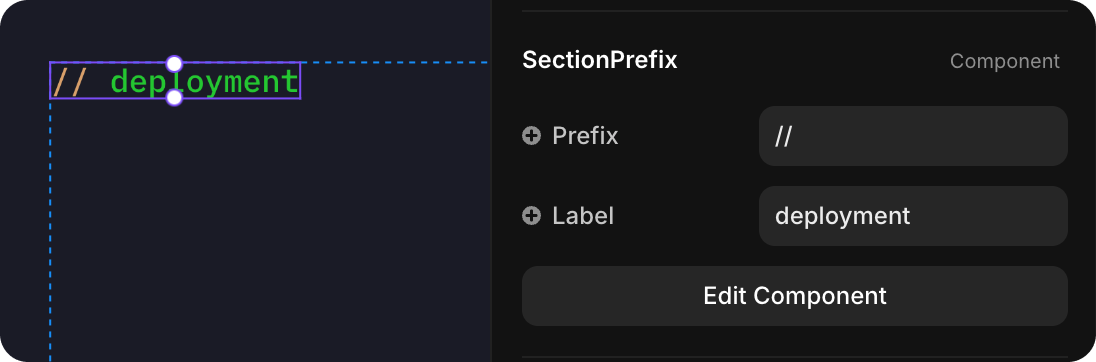
How to Edit
To customize SectionPrefix:
- Select the component — Click SectionPrefix directly on the canvas, OR find it in the Layers panel and click its name
- Open Properties — The Properties panel (right sidebar) displays all editable fields
- Make changes — Edit any property and see changes update in real-time
Property Controls
| Property | Type | Description |
|---|---|---|
| Prefix | String | Visual prefix symbol (e.g., "//", "→", "--") that appears before the label |
| Label | String | Section identifier text (e.g., "deployment", "patterns", "workflows") |
Global Design Changes
To modify the visual design of SectionPrefix across the entire site:
- Click Edit Component in the Properties panel
- You'll see the component's Variant 1 · Primary variant
- Edit the visual properties (colors, fonts, spacing, etc.) in this primary variant
- All instances of SectionPrefix across the site will automatically update with your changes
This ensures consistent branding throughout your documentation and website.